Securing Your Digital Legacy:
What You Need to Know to Safeguard Your Online Presence After You’re Gone
Evolving Media Chronicles
By Jeff Poissant, RGD
In today’s deeply connected digital world, planning for the future means looking beyond physical possessions. Your online accounts, digital assets, photos, emails, and overall digital footprint will continue to exist after you’re gone. Taking deliberate steps now ensures your wishes are followed and spares your loved ones unnecessary stress and legal hurdles.
Here are practical steps to prepare for the orderly handling of your digital assets:
1. Create an inventory of your digital assets
List every digital account and asset you maintain—social media, email, online banking, investment platforms, cloud storage, streaming services, domain names, websites, and any cryptocurrency wallets or exchanges. Include usernames, account numbers, associated recovery emails or phone numbers, and notes on what should happen to each (delete, memorialize, transfer, or preserve). Store this inventory securely and review it at least once a year.
2. Designate a digital executor
Just as you name an executor for your physical estate, appoint someone you trust to manage your digital assets. Choose a person who is both reliable and reasonably comfortable with technology. Make sure they know they have been selected and understand the scope of the responsibility.
3. Include digital assets in your estate plan
Work with your attorney to update your will, trust, or power of attorney with clear language authorizing your digital executor or fiduciary to access, manage, close, or transfer your digital assets. In most U.S. states, the Revised Uniform Fiduciary Access to Digital Assets Act (RUFADAA) supports this authority when it is properly documented. Avoid placing usernames or passwords directly in the will itself, as wills become public records.
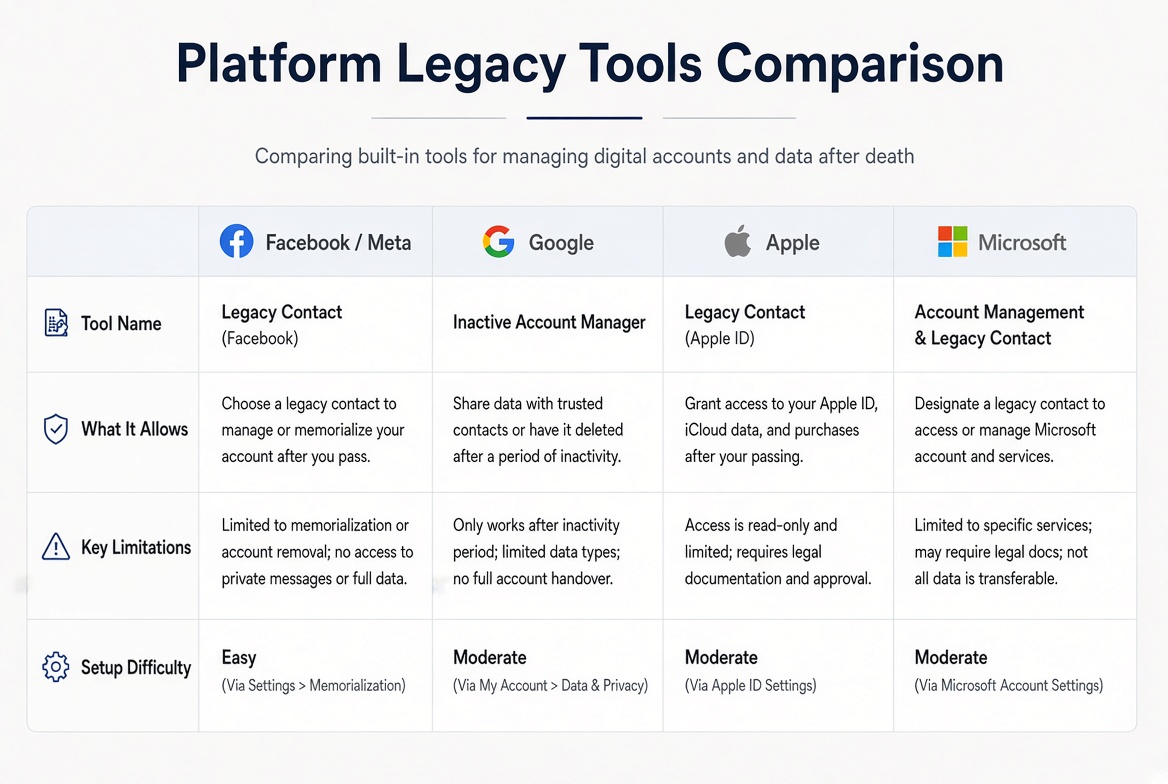
4. Set up platform-specific legacy tools while you can
Many major services now offer built-in tools that take priority over other instructions:
- Facebook/Meta: Designate a Legacy Contact (or choose “Delete after death”). A Legacy Contact can pin a tribute post, update the profile and cover photos, respond to friend requests, and—if you permit it—download a copy of the content you shared. They cannot log in or read private messages.
- Google: Activate the Inactive Account Manager. Choose how long the account can remain inactive, then decide whether trusted contacts receive specific data or the account is deleted.
- Apple: Add a Legacy Contact in your Apple Account settings. After providing a death certificate and the access key, they can download most of your iCloud data (photos, notes, files, and more). Licensed media and Keychain passwords are excluded.
- Microsoft: Use the Digital Legacy feature for OneDrive files.
These free tools make the process far smoother for your loved ones.
5. Understand the policies of each platform
Every service has its own rules. Familiarize yourself—and your digital executor—with the documentation required for memorialization, deletion, or data access. For platforms without advanced tools, a death certificate plus proof of authority (such as letters of administration or a will naming the executor) is typically needed.
6. Use a password manager and secure recovery information
A reputable password manager simplifies access for your digital executor. Enable any emergency or legacy access features the service offers, and store the master password plus instructions in a secure location known only to your designated person. Also document two-factor authentication methods, authenticator apps, hardware keys, and recovery hubs (primary email and phone), as these often unlock everything else.
7. Address cryptocurrency and high-value digital assets separately
If you hold cryptocurrency, NFTs, or similar assets, list the wallets, exchanges, and the secure location of seed phrases or private keys. These assets have no central recovery process, so clear, private instructions are essential. Never place seed phrases in a will or other public document.
8. Consider your digital likeness and AI use
As generative AI tools become more common, you may wish to include language in your estate documents stating whether you consent—or explicitly do not consent—to the use of your image, voice, or personal data to create AI-generated likenesses after your death.
9. Communicate your wishes
Tell your loved ones and your digital executor where the inventory, password information, and instructions are kept. Clear communication prevents confusion and ensures your preferences are respected.
By taking these steps now, you give your digital executor the tools and direction needed to handle your online presence according to your wishes. Safeguarding your digital legacy has become an essential part of thorough estate planning in the modern age.
Helpful Official Resources
- Meta/Facebook: Help pages on memorialization and Legacy Contacts
- Google: Inactive Account Manager (under Data & privacy in your Google Account)
- Apple: Legacy Contact settings in Sign-In & Security
- Uniform Law Commission information on RUFADAA for state-specific details
Review and update your plan periodically to keep it current with new accounts and evolving platform tools.